
User guide
Database initialization
DatabaseService does various tasks upon initialization:
create db, initialize pg extensions, create users, create tables and functions, etc.
Superuser pg credentials are only required to initialize the database, users and extensions since these operations require superuser. You can set init_db=False in the database service config to skip this. Otherwise use root_user and root_password service settings to provide superuser credentials.
init_table=False disables table creation upon the start of the app. Note that tables are automatically created only if they are not present in the database.
Note
The database service will not alter or remove tables. Such operations would require pre-configured migrations (see Migrations).
The database initialization sequence is shown below.
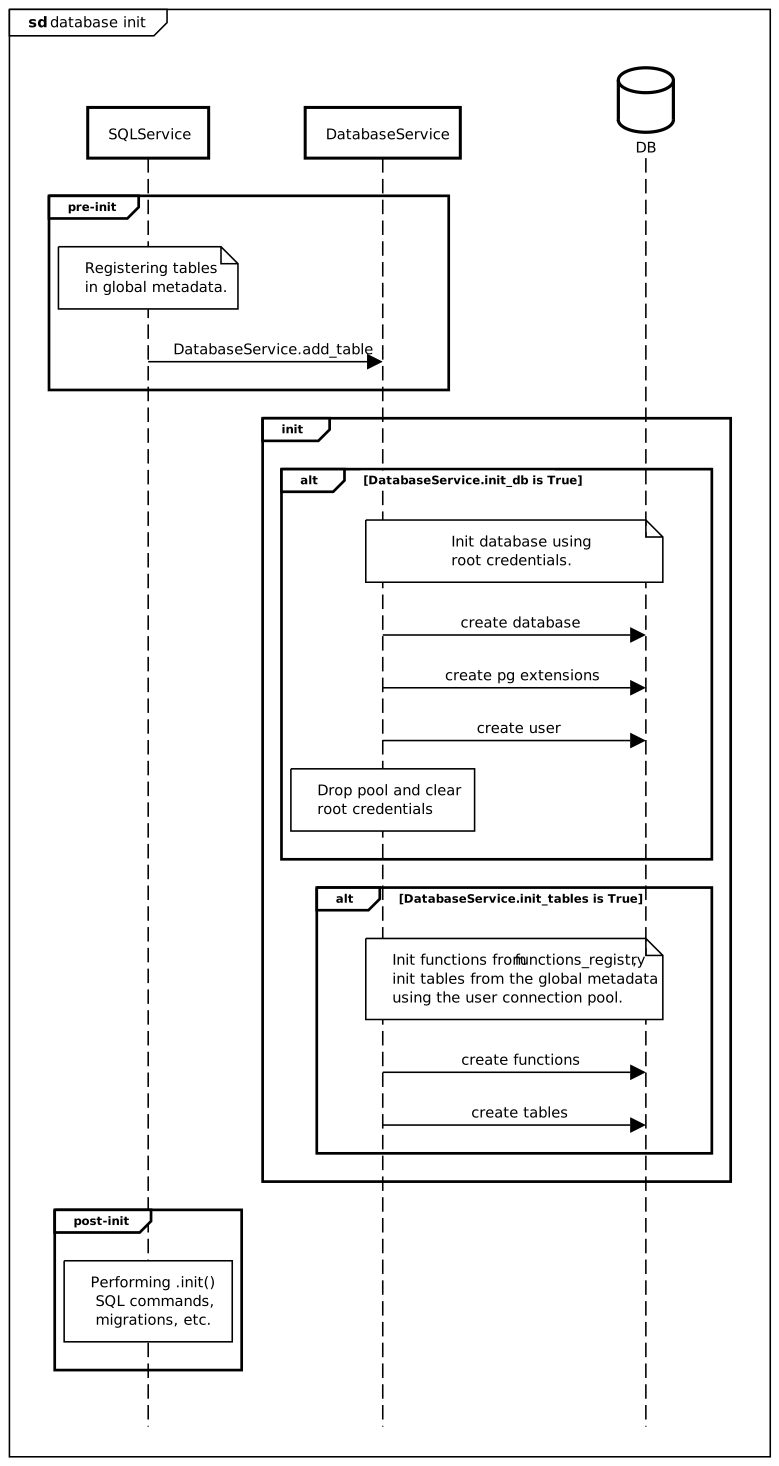
All db operations are performed using DatabaseService which provides transport between
postgres and services.
Here is a configuration example.
settings:
  services:
    cls: DatabaseService
    settings:
      host: localhost
      port: 5432
      database: my_db
      user: app_user
      password: 123
      root_user: postgres
      root_password: postgres
      init_db: True
      init_tables: True
      pool_size: 4
      extensions:
        - ltree
Each table must be registered in the global metadata using add_table()
function before the app has started. SQL service classes do this by default (see SQL interface for details).
Here is an example of manual initialization.
SQL interface
SQLService provides a standard interface for your services working with the database:
both for internal and RPC methods. Most of the standard library services use this interface to access data.
Select
Selection can be done easily using get() and
m_get() methods.
# equivalent to SELECT * FROM table WHERE id == obj_id
item = await my_service.get(obj_id)
# you can specify which columns to return
items = await my_service.m_get([id_1, id_2, id_3], columns=['id', 'name'])
Create
Use create() or m_create()
to add data to the table.
# create an object and do not return anything
await my_service.create({'id': 1, 'value': True}, columns=[])
# create multiple objects, discard conflicting ones
data = await my_service.m_create([{'id': 1, 'value': True}, {'id': 2, 'value': True}], on_conflict='do_nothing')
Update
update() and m_update() can be
used to update existing rows.
# update a single object
await my_service.update(obj_id, {'value': False}, columns=[])
# update multiple objects
await my_service.m_update([id_1, id_2, id_3], {'value': False}, columns=[])
You can conditionally select objects for the update. See Conditions for more info.
# update only objects with expire time > now
await my_service.m_update([], {'value': False}, conditions={'expires': {'lt': time()}}, columns=[])
Delete
delete() and m_delete() are
used to remove objects from the table.
await my_service.delete(obj_id)
await my_service.m_delete([id_1, id_2], {'value': False})
Similar to the update methods you can use Conditions to select objects for removal.
# delete only objects with expire time > now and return primary ids of the deleted ones
await my_service.m_delete([], conditions={'expires': {'lt': time()}}, columns=['id'])
Exists
exists() and m_exists() provide
a shortcut for checking for object existence. The latter one returns a set of existing ids.
Iterate
list() and iter() are used to
iterate over selection of data in chunks. The first one is more useful in RPC requests or other paginated queries
since it provides limit and offset input params and count of returned objects.
Conditions and Sorting are supported by both methods.
await my_service.list(conditions={'value': {'gt': 42}}, offset=10, limit=10)
This query will result in something like this:
{
    count: 152
    offset: 10
    page: 2
    pages: 16
    on_page: 10
    data: [
      {'id': 'row_1'},
      {'id': 'row_2'},
      {'id': 'row_3'},
      ...
    ]
}
iter() is better used from within code since it provides a way to iterate
over a query in an async generator. Other than that it is similar to the previous method. limit param is obviously
controls a max number of items in each batch.
async for batch in my_service.iter(conditions={'value': {'gt': 42}}, columns=['id', 'value'], offset=0, limit=100)
  ...  # do something with a batch
Conditions
Update and Iterate methods can use conditions param to specify filtering with its keys associated to the database column names.
# WHERE
{"col": "v"}  # col = 'v'
{"col": ["v1", "v2"]}  # col IN ('v1', 'v2')
{"col": {"not": "v"}}  # col != 'v'
{"col": {"gt": 1, "lt": 2, "ge": 1, "le": 2}}  # col > 1 AND col < 2 AND col >= 1 AND col <= 2
{"col": {"like": "%sht%"}}  # col LIKE '%sht%'
You can combine conditions for multiple columns in the same dict.
{"col1": 42, "col2": True} # col1 = 42 AND col2 IS TRUE
You can also combine multiple complex conditions into an OR block using list at top level of the condition.
await service.m_update(
  id=[],
  data={"active": False},
  conditions=[    # WHERE (col1 > 3 AND col2 = 42) OR col3 IS TRUE
    {"col1": {"gt": 3}, "col2": 42},
    {"col3": True}
  ]
)
Sorting
For Iterate methods you can specify in what order you’d like to have output data. This is done by providing sort parameter. Note that similarly to SQL there can be multiple sorting columns.
await my_service.list(sort=[{'asc': 'author_name'}, {'desc': 'updated'}])
# you can also use plain column names which is a shortcut to {'asc': <column_name>}
Create SQL services
To create an SQLService is very simple. You have to define an sqlalchemy table
and subclass your service from the base class.
import sqlalchemy as sa

from kaiju_db import SQLService
from kaiju_tools.rpc import PublicInterface  # required only if your service is public

my_table = sa.Table(
  'my_table', sa.MetaData(),
  sa.Column('id', sa.TEXT, primary_key=True),
  sa.Column('value', sa.INTEGER)
)

class MyType(TypedDict):
  id: str
  value: int

# type hinting primary key and value inside [] is not required but encouraged
class MyService(SQLService[str, MyType], PublicInterface):
  # the table will be registered automatically
  table = my_table
It’s ready! However you would have to add this to the app configuration yaml file and to the service registry to actually make it work inside your app.
# somewhere in your code

from kaiju_tools.app import SERVICE_CLASS_REGISTRY

SERVICE_CLASS_REGISTRY.register(MyService)
In your app config file:
services:
  cls: MyService
A working instance of DatabaseService is also required to actually run db queries.
Blacklisting columns
You can blacklist or whitelist columns available for selection or update. For example you have to be sure that password hashes can’t be selected or updated in the customers table. Simply add this to your service.
class MyCustomerService(SQLService, PublicInterface):
  table = customers
  select_columns_blacklist = {'hash'}   # you can exclude some of the columns from the output
  update_columns_blacklist = {'hash'}  # you can disable updates on certain columns as well
Input normalization
You can use prepare_insert_data() and
prepare_update_data() hooks to modify inserted or updated rows before
execution. It can be used, for example, to validate some complex values, insert a user or session identifier etc.
def prepare_insert_data(self, data: dict) -> dict:
  session = self.get_session()
  if session is not None:
    data['user_id'] = session.user_id
  return data
Permission hooks
The service provides conditional hooks to modify conditions of the standard methods:
get_condition_hook(), insert_condition_hook(),
update_condition_hook(), delete_condition_hook().
These hooks can be used to pre-filter data, impose permissions etc.
def get_condition_hook(self, sql):
  """Get only rows visible to the current user."""
  session = self.get_session()
  if session is not None:
    sql = sql.where(self.table.c.owner == session.user_id)
  return sql
Migrations
This package provides a simple migration tool DatabaseMigrationService which can
execute migrations manually specified by a developer.
The migration service maintains the state in a table called db_info which contains the current state id. When a migration is requested, the service would fetch the state id and compare it to each migration in the migration file until it finds a new state. It will execute this and each consequent state in a separate transaction block incrementing state id in db_info table. The migration is considered completed once the last state is reached.
The idea is that a developer would use a json file (./etc/migrations.json by default) to manually write sets of commands for each migration state. Generally the file should be in your app’s repository.
Migration file example (id, commands - required). Id should start from 0 and be in asc order. All commands at each state will be executed sequentially but in a single transaction.
[
  {
      "id": 0,
      "comments": "my dev comments",
      "commands": [
          "ALTER TABLE my_table ADD COLUMN new_col DEFAULT NULL;",
          "ALTER TABLE my_table DROP COLUMN old_col;",
      ]
  }
]
Use migrate() to perform a migration. You can also provide
migrate_on_start=True flag to the migration service to perform migrations automatically upon the app start.
Example of migration service config in settings.yml.
settings:
  services:
    cls: DatabaseMigrationService
    enabled: True
    settings:
      migrations_file: ./etc/migrations.json
      migrate_on_start: True
Fixtures
FixtureService can be used to automatically load pre-defined data into the tables.
It supports SQLService interfaces.
Create a directory for fixtures in your project dir (for example, ./fixtures)
Add a file with .json extension and with the name matching sql service name you want to create fixtures for. For example, ./fixtures/tasks.json file for your “tasks” service with an array of tasks to create.
[
  {"id": "cache.clear", "commands": [{"method": "cache.clear"}], "cron": "* * * * *"},
  {"id": "orders.sync", "commands": [{"method": "orders.sync"}], "cron": "* * * * *"}
]
Next you need to add a fixture service to your project config file, and the service will automatically load fixture data on init.
services:
  cls: FixtureService
  settings:
    root_dir: ./fixtures